Door security at venues and static guarding in the same app: SOS, radio, incidents and reports – shared in real time with everyone on duty, and a control room and customer portal for management.
The app on iPhone (Android coming soon) – managers also on a PC. Try it free with one location, no commitment.Free to get started with one location.
What you get
What you get with Vekterlogg
One system for venues and static sites. Choose for each location whether it's a venue or a static site, and the wording in the app, the reports and the alerts follow your choice. The guards have the app on their phones, and management follows along from the PC.
Door security at venues
Guest counter with capacity, age check, bans, confiscations and the countdown to last call – everyone on duty sees the same numbers, and the venue gets the final report.
Static guarding
Visitor log, a key cabinet with due times and a logbook at the site, and the site card with the address, the keys and the contacts. Each shift gets its own shift report.
Patrols with checkpoints
A QR code or NFC tag at each zone, deviations with a photo, and locking and opening rounds at set times. If a round isn't done in time, the guards get an alert, and then management.
SOS and radio
SOS with location, silent SOS, call-out, routine check-in and fall alarm – and push-to-talk over 4G, 5G and Wi-Fi, also with a locked screen and a Bluetooth button.
Reports and documentation
Incidents and use-of-force reports in a few taps. The final report and the shift report are done when the job is done, built from what was recorded along the way.
Control room and customer portal
Follow the venues and the sites live from the PC, and keep the schedule, the hours, payroll, invoicing and HSE together in the customer portal.
All plans include as many users as you like, on phone and PC. A location is a venue or a static site. More than 20 locations? Contact us for a quote.
Features
Everything the guard needs on duty
Used in live operations, night after night. What you need often is one tap away.
SOS with location
Hold down the SOS button, and the alarm goes straight to your colleagues on duty where you are and to management. They see where you are, and you see who's coming and how far away they are.
Incidents and use-of-force reports
Choose what happened, dictate or type the text and save – all on one page. If force was used, each person involved gets their own use-of-force report, filled in with the time, place and text.
Radio
Hold down and talk, and the group hears you instantly – over 4G, 5G and Wi-Fi. It works with a locked screen, a headset and a Bluetooth button, and you can play back what's been said.
Chat and messages
Chat with voice messages, photos, quick buttons and reactions – and important messages from management that must be confirmed, with reminders until everyone has read them.
Guest counter
Count in and out with big buttons – also with several entrances against the same capacity. The colour shows how full it is, everyone on duty sees the same number and gets an alert when it's nearly full.
Call-out until someone answers
Need help? Hold down the button to call a guard or a manager. The alert repeats until a colleague answers “I'm coming”, and you see who's coming, how far away they are and roughly when they'll arrive.
Bans and sightings
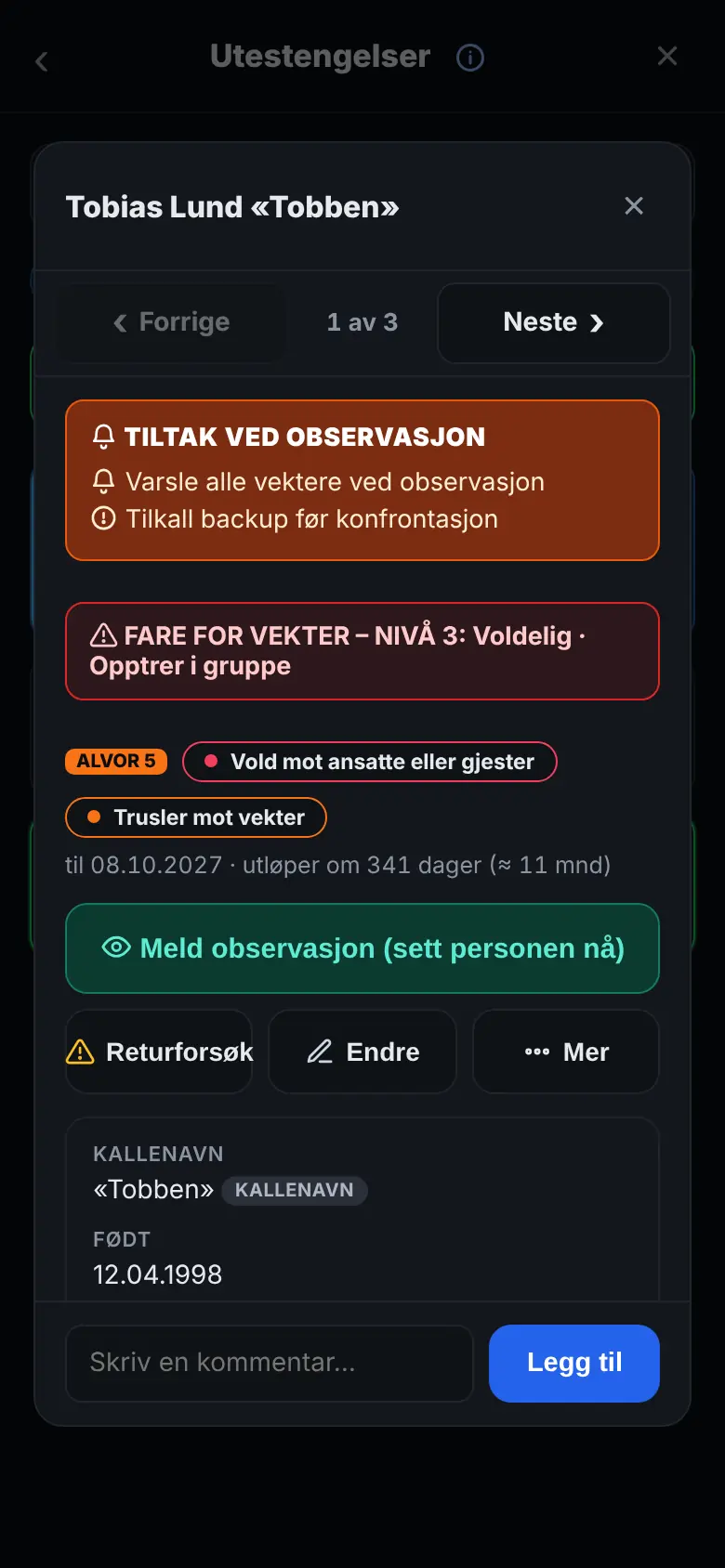
Who is banned, with photo, severity and end date. If you spot one of them in the queue, tap “Report a sighting”, and the others on duty are told. Danger and actions tell you how careful to be.
Age check
Enter the date of birth, and the answer appears in large letters: OK or Too young. With the full national ID number, the app also checks that it's genuine. Nothing about the guest is stored.
Confiscations
Register what you take from a guest, with a photo and where it is now. The app reminds you until it's been handed to the police or locked away, and the confiscations are listed in the final report.
Screen at the entrance
Show how many people are inside on a TV or tablet, in the same colour as in the app. The screen is connected with a code and shows no names.
Last call and fire alarm
A countdown to last call with the steps for closing, reminders at the times you choose, and the Fire button with your own steps to follow when the fire alarm goes off.
Static guarding
At a static site, the guard keeps a visitor log, a key cabinet with due times and a logbook, and each shift gets its own shift report. The site card has the address, the keys and the contacts.
Locking and opening rounds
Rounds with times, days and the items the guard goes through. The card appears on the home screen half an hour before, and if the round isn't done by the deadline, the guards on duty get an alert – and a quarter of an hour later the control centre and management.
Patrols with checkpoints
Scan the QR code or NFC tag at each zone on the patrol, and write up deviations with a photo where you stand. The patrol is saved even without coverage, and the final report shows what was scanned and what was ticked off.
Final report by email
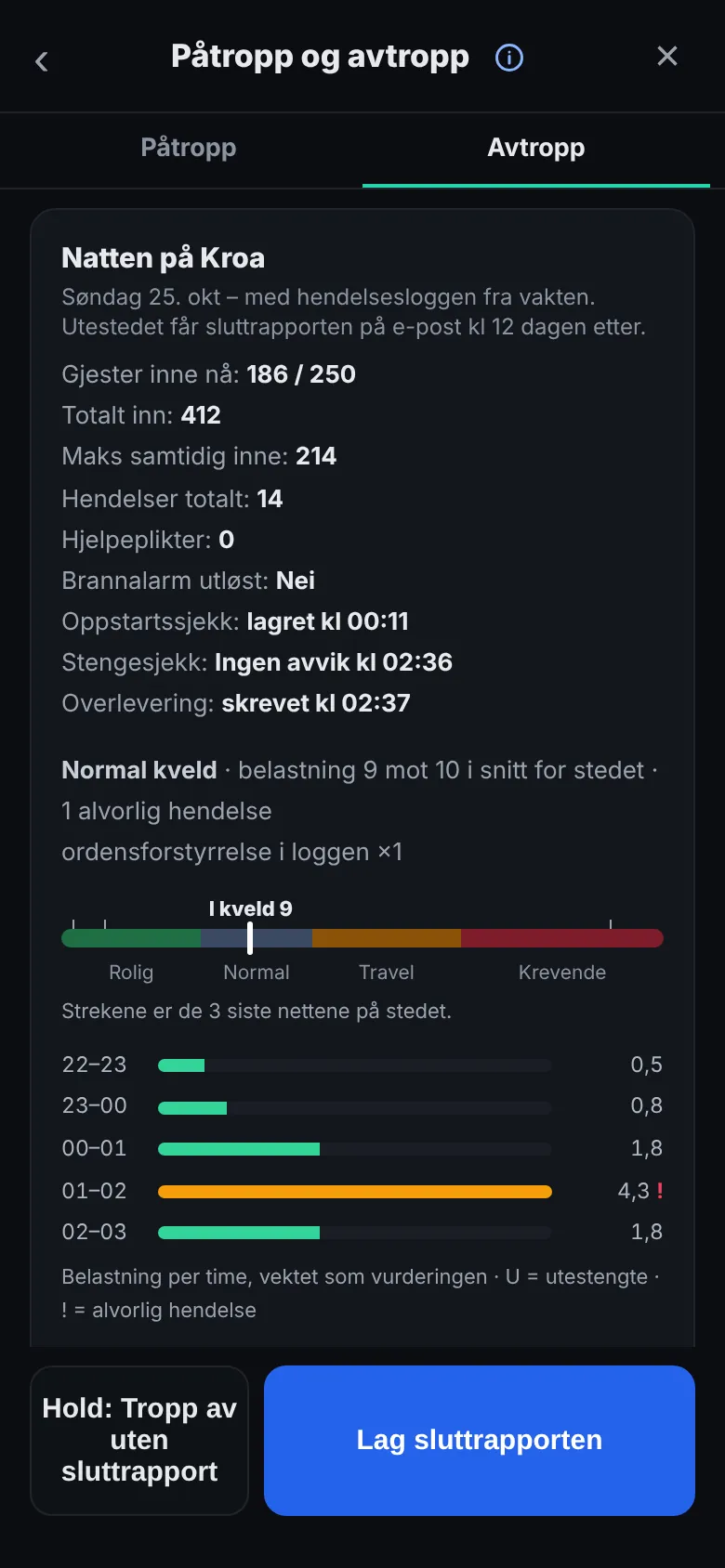
When the shift is over, the report is done: the evening hour by hour, staffing, incidents, confiscations and lost and found. Management and the venue get it by email, and at a static site each shift gets its own shift report.
Schedule and hours
A schedule with a reminder before the shift, shift swaps and open shifts – also in the calendar on your phone. Hours are recorded automatically when you go on and off duty.
Notes and photos
Take a photo straight from the front page of the app or write a note – just for yourself or for everyone on duty, with a reminder if you like. Everything is deleted automatically after 30 days.
Improve the text with AI
One tap corrects typos and makes the text in the incident and use-of-force reports factual, and before you send, the AI tells you if the time, the place or what happened is missing. The original is kept. Can be switched off for the organisation.
Statistics and overview
See how the evenings develop over time, and follow all locations live from the PC.
Without coverage
The incidents, the counters, the reports, the chat and the hours are kept safely on the phone and sent when coverage is back – and the app starts with the settings it last received.
Courses and training
Short courses with questions and situations from the job: use of force, conflict management, age checks, first aid, fire and more. Management creates its own courses and sees who has passed.
Level and badges
The level from time in service, badges for what you do on duty and the guard passport with a stamp for each location. Under “Colleagues” you see the others' level and badges.
HSE in the app
Report deviations in the working environment – also anonymously – carry out safety inspections, blow the whistle on wrongdoing and confirm that you've read the HSE handbook.
The app in English
Each person can use the app in English, and what they write in the reports is translated into Norwegian.
What it looks like
Made for the job – at the door and at the site
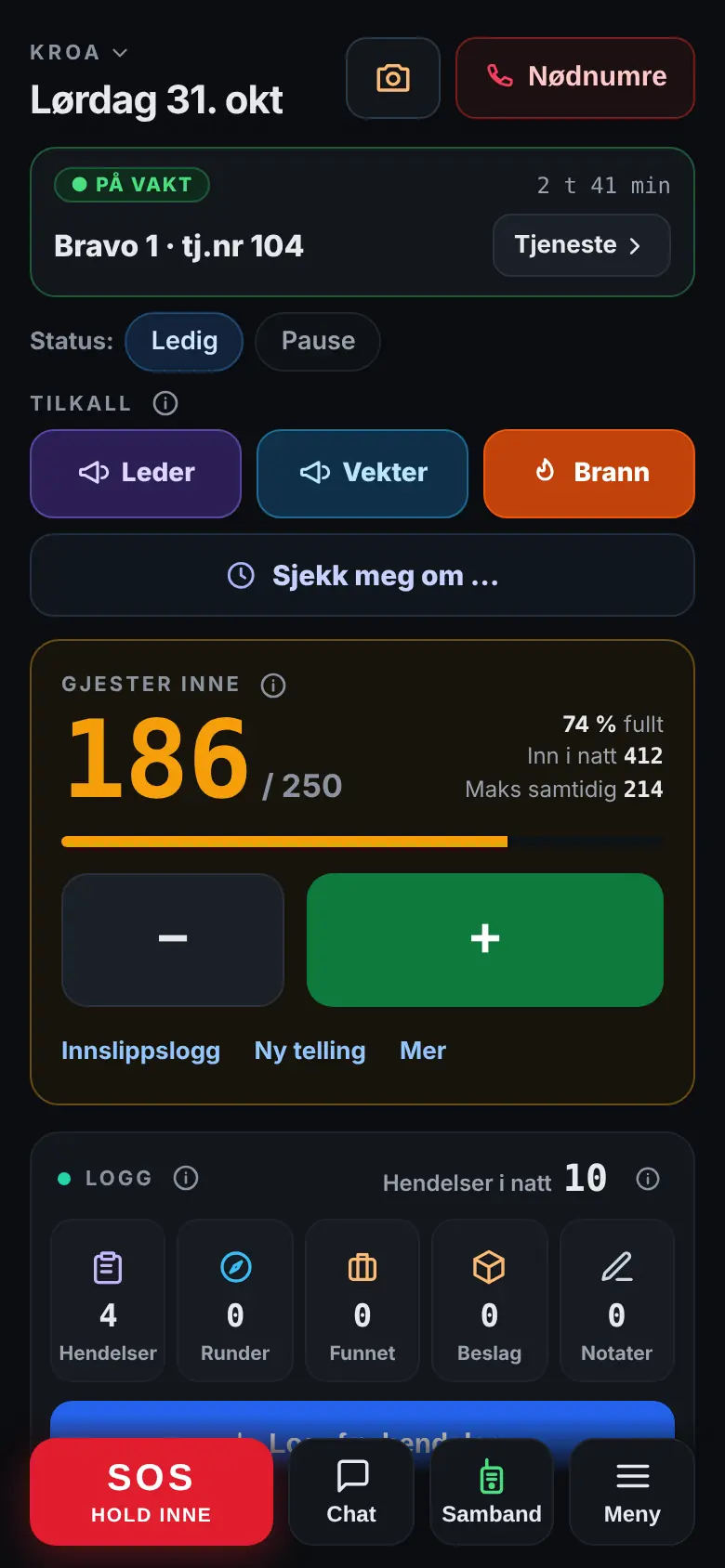
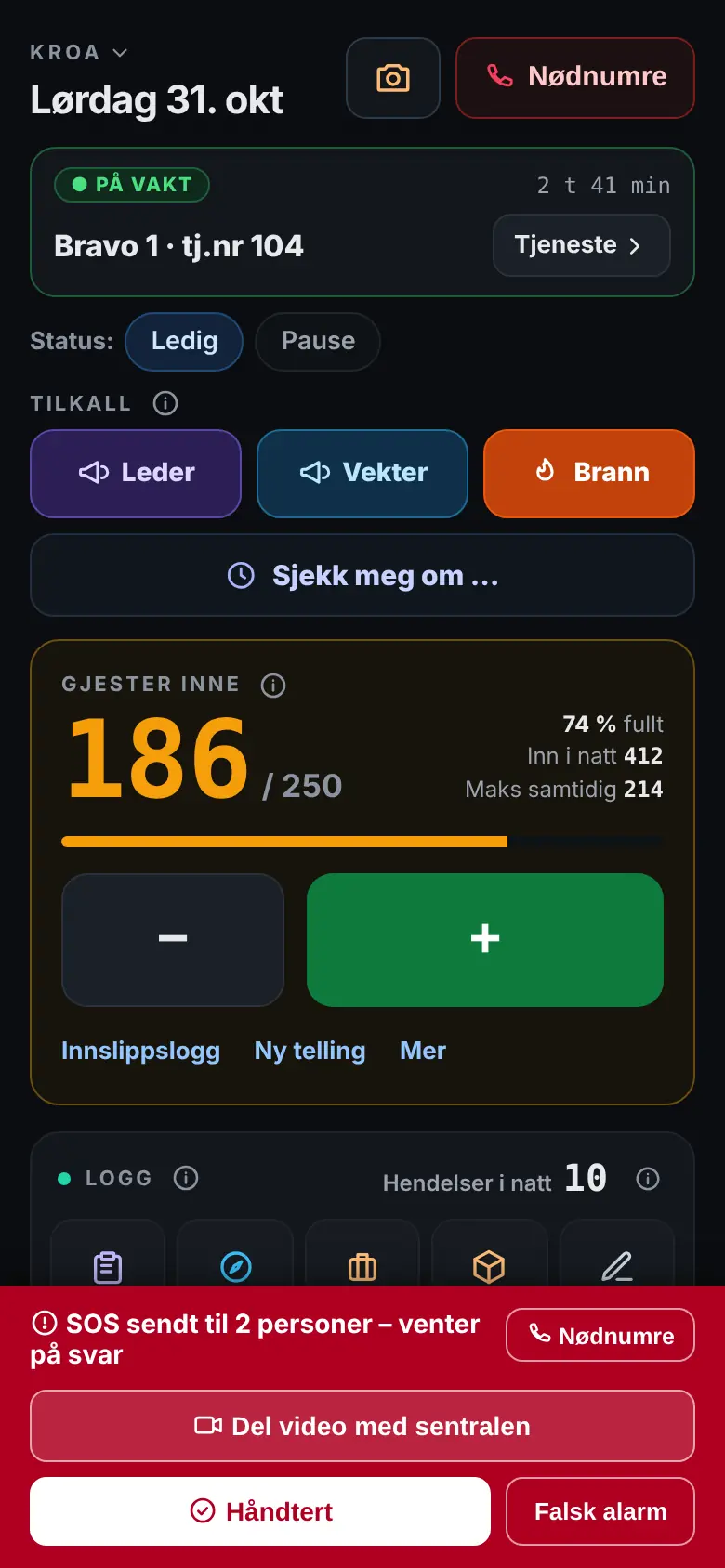
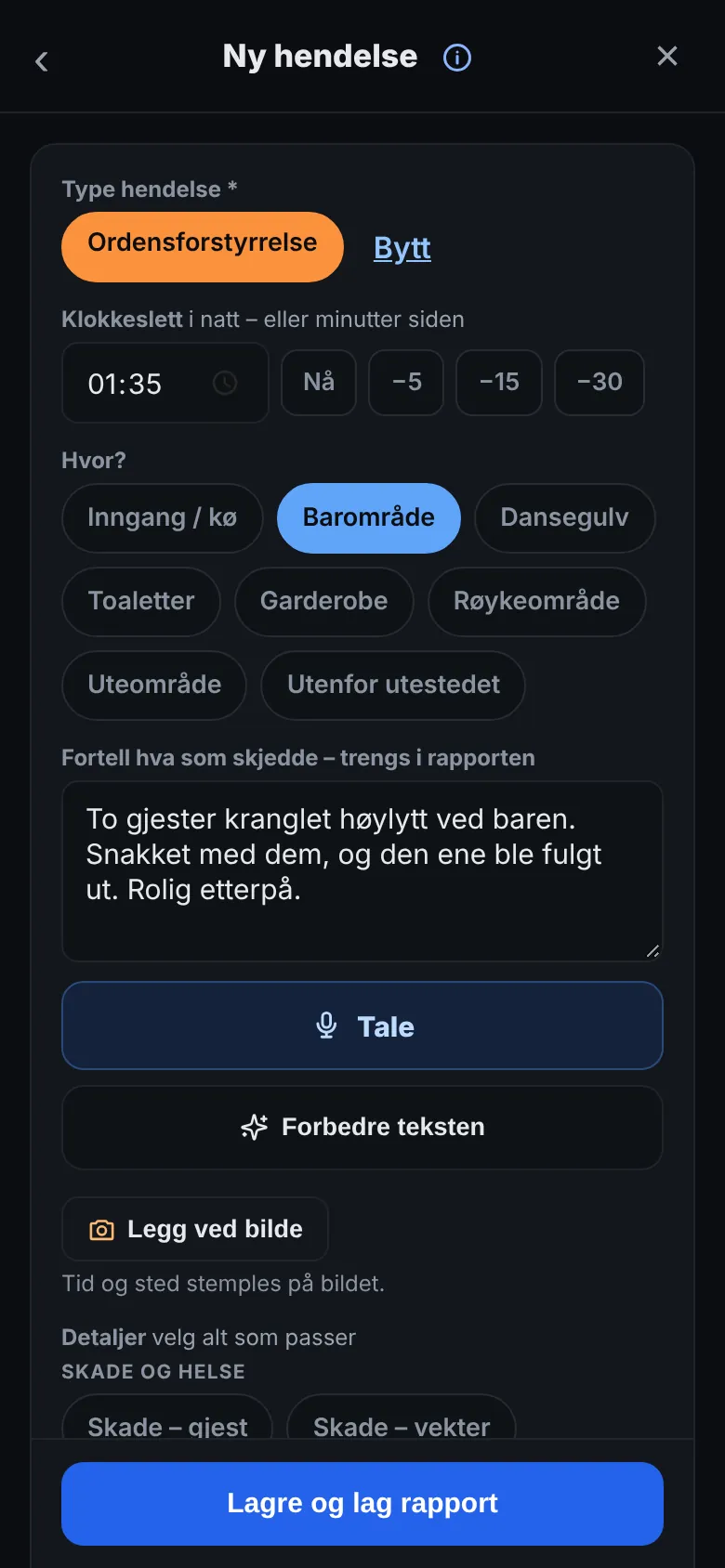
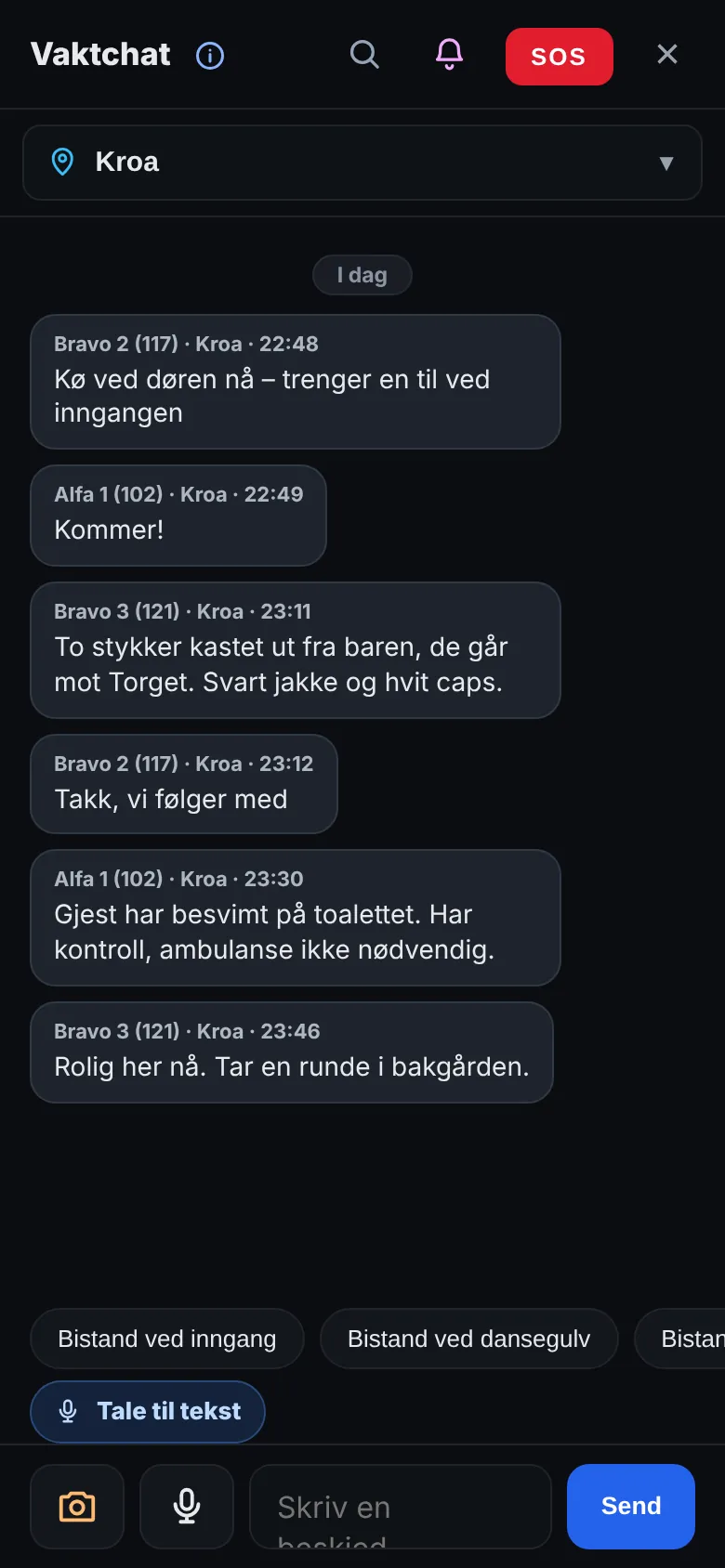
Big buttons, a dark screen and the most important things first. The pictures are from the app, with made-up names and venues – the app is shown in Norwegian.
SOSColleagues and management are alerted straight away.
New incidentType and details in a few taps.
ChatKeep in touch across the venues.
Final reportThe evening summed up, ready to send.
BansWho is banned, how serious it is and what the guards should do.
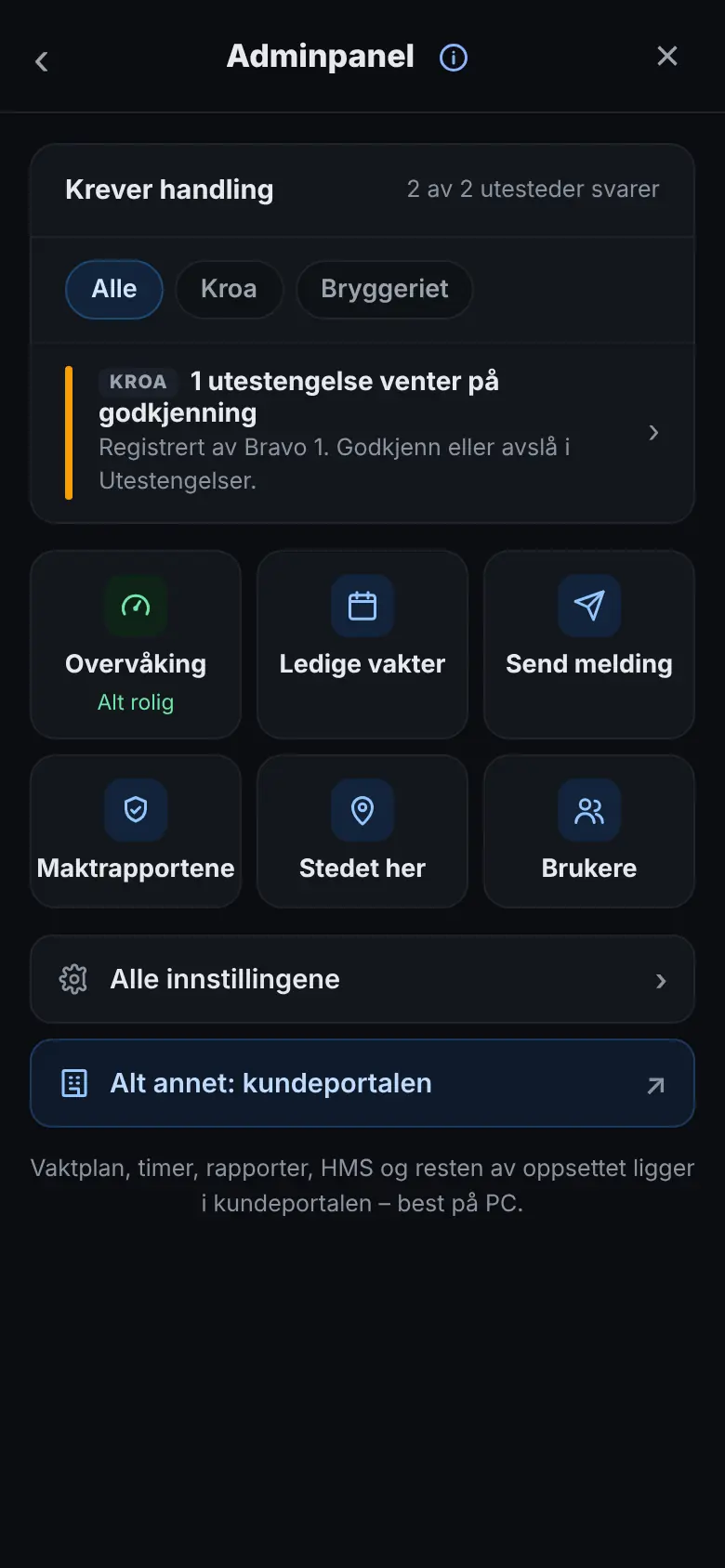
Admin panelWhat needs action, and the settings for the location.
Swipe to see the whole picture
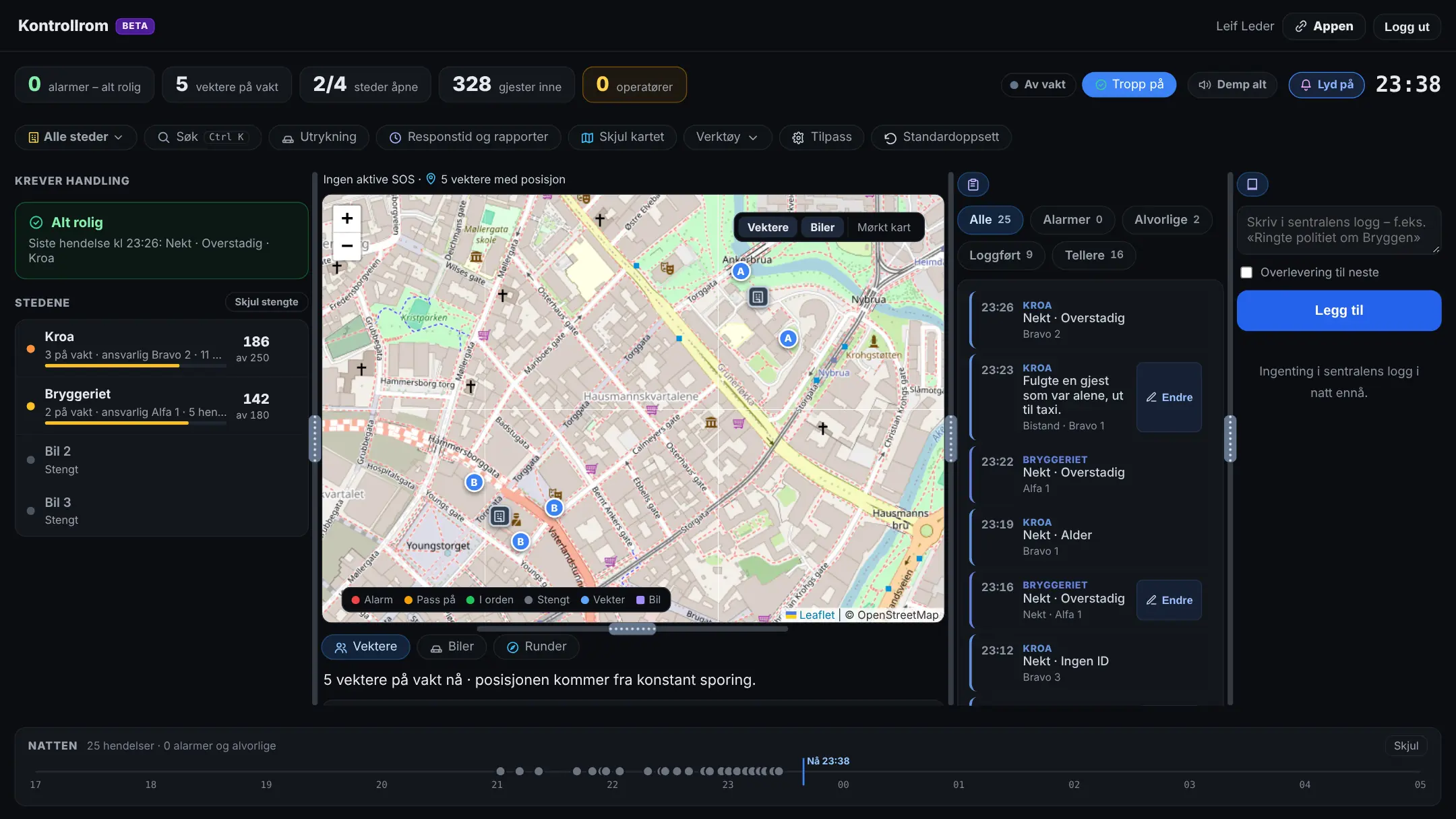
Control room – all locations on one screen, with a map, incidents and sound alerts.
Swipe to see the whole picture
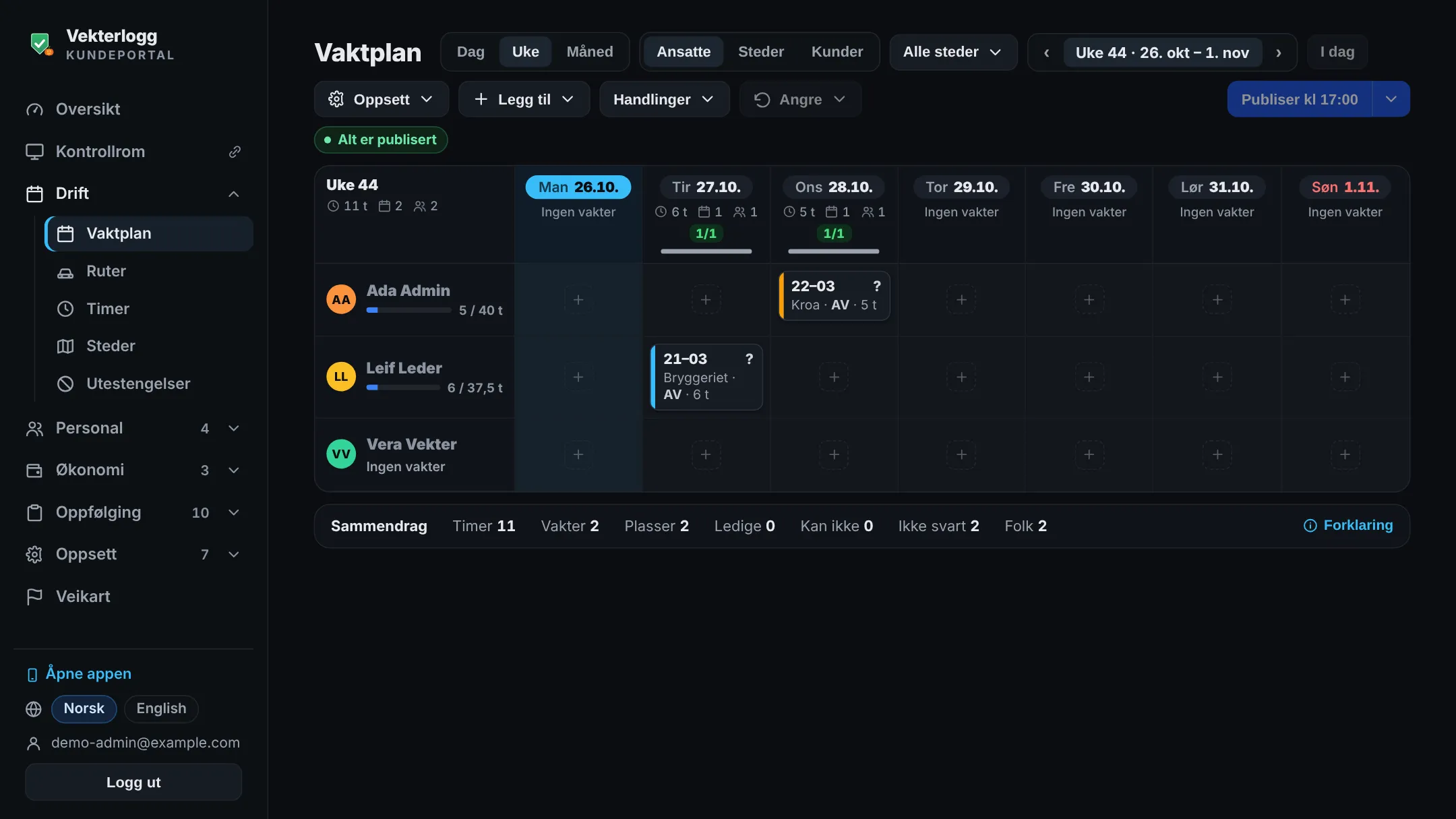
Customer portal – the schedule for the week, with the shifts, the hours and who has replied.
When it matters
SOS that works when you need it
The most important thing the app does is get help there fast. That's why the SOS feature has several safeguards.
Hold down
The SOS is sent when you hold the button down for a moment, so it isn't triggered by accident in your pocket. The phone vibrates when it's been sent, and the alert repeats until each person has answered.
Silent SOS
Keep holding for 4 seconds, and the SOS becomes silent: no sound or vibration on your phone, and your colleagues are told not to call you.
Location and replies
The others see where you are on the map, and you see who's coming – with the distance and roughly when they'll arrive.
Hear what's happening
With the radio, your microphone opens when you send an SOS. Colleagues, managers and the control centre hear what's going on, so you don't have to say anything.
Even without a connection
If the phone loses its connection, the SOS waits and is sent as soon as the connection is back – with the time it was triggered.
From the right location
The SOS is sent from the location where you actually are, even if the app is set to a different one.
Your own SOS button
Connect a small Bluetooth button to the app, and hold it down to trigger an SOS without taking out your phone – even with a locked screen.
Routine check-in
The app asks “All OK?” at regular intervals, and whatever else you do in the app counts as an answer. If you're about to do something alone, tap “Check on me in …” and choose how long. If no answer comes, the rest of the team is alerted.
Fall alarm
If the phone detects a fall, or that it's been lying completely still, it asks “All OK?” with a countdown. If nobody answers, the SOS goes off by itself. Managers switch it on, and it works while the app is open.
Control room
A control room for management and the control centre
Follow all locations live, run the radio and write the reports for the guards from the PC – right in the browser at app.vekterlogg.no/kontrollrom, with nothing to install. You decide who gets access: management, the control centre with the Operator role, or the managers out in the field. On the phone it's called Monitoring. The control room is included in Komplett and in the trial, and can be added to Basis and Pluss. The control room is an add-on – contact us, and we'll switch it on for you.
All locations live
The venues and the sites on one screen: the number of guests, who's on duty and tonight's incidents – the most serious first.
Alarms with sound
SOS, silent SOS, fire alarm, routine check-in and fall alarm go to the top, with sound until they're handled. “I'll take it” shows everyone who has the alarm, and the actions show what the control centre should do.
The guards and the map
Who's on duty where, with call sign, status and a call button – and the guards, the alarms and the locations on the same map. Send a task to a guard, and you'll see the reply.
Tonight's patrols
The patrols per location: how they stand against the patrol requirement, who did them and when, the zones scanned or ticked off, and the deviations with photos. Tap a patrol to see the zones on the map.
The control centre on the radio
Listen to all talk groups at once and talk with the space bar or a foot pedal. Break in, talk privately, lock or link groups – and listen in on an SOS.
Needs action
The Admin panel shows what managers should deal with now – for example a use-of-force report that's missing, or waiting for the guard's signature or the responsible person's signature, or a night with too few on duty. “Remind” sends a reminder to the person concerned.
Incidents with filters
Incidents across the locations – all of them, or just the serious ones: SOS, use of force, police, ambulance and fire. Tonight's alarms are there too, with how they ended and who took them.
Write for the guards
Log and correct incidents, and write an incident report for a guard who's in the middle of a situation. The report shows who wrote it and who it concerns, and the guard can read it themselves.
Use-of-force reports the guard signs
The control room can write the use-of-force report for the guard. It stays “waiting for confirmation” until the guard has read and signed it in the app.
Operator in the control centre
A ready-made role for the control centre: the control room, the alarms, the radio and the guards' contact cards with mobile number and line manager – without the setup. The operators go on and off duty in the control room, and SOS goes to those on duty in the control centre.
Customise the screen
Drag the alarms, the map and the tabs where you want them – in columns, stacked or as tabs. The layout follows you to another PC.
Roles and tags
Decide what each role sees and can do – including who gets to use the control room. Tags such as Control centre, Shift planner and Safety representative give a person extra permissions on top of their role.
Customer portal
Your whole operation in the customer portal
At portal.vekterlogg.no, management has everything that's done from the PC: the setup, the sites, the employees, the schedule, the hours, the customers, HSE and the reports. Other roles get in when you give them access, and only see the pages they should.
Setup and users
Company, locations and the app's settings, with the “Get started quickly” wizard. Invite the employees, give them roles and tags, and connect the screens at the entrance.
Site cards and rounds
The site card with address, contacts, keys, instructions and floor plan – and the locking and opening rounds with times, days and the items the guard goes through.
Employees
The employee card with position, employment contract, documents with expiry dates and the equipment handed out. Guards apply for holiday and time off in the app, and management approves in the portal.
Schedule and hours
Set up the schedule with a rotation and publish it – the guards reply, swap and take open shifts in the app. Hours are approved against the schedule, with deviations highlighted.
Pay and invoicing
The payroll basis according to the collective agreement and the invoicing basis per customer, straight from the approved hours. Lock the month and export to the accounting system.
Customers
The customer register with contact person, locations and assignments – regular guarding or events. For security and stewarding companies.
HSE
Deviations in the working environment with actions, owner and deadline, the injury register, the safety inspections, the risk assessments and the HSE handbook – with who has read and understood it.
The report archive
The final reports and the use-of-force and incident reports for all locations, gathered in one place – and the radio recordings for those with access.
Report to the police
The annual report that must reach the police by 31 March: the list of employees in the police template and the use-of-force log for the year, built from what you've already recorded.
Sharing and cooperation
Choose what your own locations share: SOS, radio and the alert when a banned person is spotted. With other organisations you can share chat, SOS, a talk group and location when both say yes. Bans are only shared between locations with the same owner.
Group
Bring the branches together in a group. The group sets common standards and can lock settings for the branches.
The control room
If you have the control room, you open it from the portal in a separate tab – without logging in again.
Documentation
Documentation that stands up to an inspection
What happens during the night is written down as it happens – not from memory the next day. Then you have the answer ready when the police, the licensing inspection, the fire service, the customer or management asks.
Use of force and incidents
An incident report with time, place and what happened, and a use-of-force report from each person involved – filled in with the details from the incident in the log. The use-of-force report is signed by the guard and countersigned by the person you've chosen as responsible.
The use-of-force log
All use-of-force reports for a month or a year, with both signatures and what's pending – download as PDF and CSV.
Age and refusals at the door
An age check against the location's age limit, and refused and removed guests counted with a reason – one tap, no names. You can add your own reasons.
Guest numbers and capacity
How many were inside hour by hour and per quarter hour, and the highest number compared with the capacity – in the final report every night, and as PDF and CSV for the fire service or the licensing inspection.
Bans
Who is banned, why and for how long – approved by a manager, with the decision as a PDF and an alert before the ban expires. The sightings, return attempts and comments are kept in one history for the person.
Confiscations
What was taken, where it was stored, and when and to whom it was handed to the police – ideally with the case number and a photo of the receipt.
Who was on duty
Going on and off duty, lead guard and hours – for every location, every night. Anyone who forgets to go off duty is signed off at the time you set.
ID cards, approval and courses
Each guard records the expiry dates for their ID card, approval and courses with a photo of the certificate, and a manager approves them. Reminders 60 and 30 days before anything expires.
Final report, shift report and archive
Every night at the venue ends in a final report to management and the venue, and every shift at a static site in a shift report. Everything is in the archive afterwards.
Visitors, keys and logbook
At the site, the guard records who came and went, who got which key and whether it came back in time, and the logbook for the shift – so it's ready for the next shift and for management.
Changes that are kept
Submitted reports can be changed. The old version is kept, and the report shows who changed it and when.
Instructions that have been read
Add your own instructions for the whole organisation and for each location – as a link or a document. When they're new or changed, the guards confirm in the app that they've read them, and managers see who has. The security company and the venue can write the venue's instruction together, point by point from Vekterlogg's standard.
Who it's for
For venues and security companies
Made for door security at venues and static guarding at fixed sites. Whether you have one location or many, everyone works in the same app, and each person sees what they need.
Venues with their own stewards
Run your own door security, with tidy documentation of every night.
Guest counter with capacity and admission log
Incidents, use-of-force reports and bans in one place
SOS, call-out and routine check-in for the stewards
Radio in the app instead of walkie-talkies
Schedule and hours for the employees
The final report by email after every night
A screen at the entrance showing how many are inside
No consultants and no setup fee. Three steps from sign-up to the first shift.
1
Create the account
Create the account in the app or in the customer portal – the “Get started quickly” wizard takes you through the setup. It's free to try with one location.It's free.
2
Add the guards
Add them in the customer portal or in the app. They get an email with a link where they choose a password.
3
Download the app
Download Vekterlogg from the App Store (Google Play coming soon) and go on duty – at the door or at the site.
The information in the log is often sensitive. That's why it's well protected.
Separate per customer
Each organisation has its own data, kept separate on the server.
Stored in the EU
The data is stored encrypted in the EU, and all traffic between the phone and the server is encrypted.
Passcode lock, two-factor and roles
Pages with personal data are locked with a passcode, Face ID or fingerprint, sign-in can be secured with two-factor authentication, and roles control who sees what.
Questions and answers
Frequently asked questions
What many people wonder before they start using Vekterlogg.
What does “Beta” next to the logo mean?
Vekterlogg is in beta. The app is in use, but we're still adding and fixing a lot, and we're glad to hear what you notice. When the app is fully launched, the label disappears.
Do the guards have to download the app?
Yes. Vekterlogg is an app for iPhone – download it from the App Store. The Android app is coming soon to Google Play. It's the app that gives alerts for SOS, call-outs and chat, and that works with the SOS button, the radio with a locked screen, location and routine check-ins. Most of this is missing in the browser on a phone. Managers can also follow along from a PC at app.vekterlogg.no.
What's the difference between the app and the customer portal?
The customer portal is for management. That's where you enter the company, locations and site cards, set up the app, add the employees and sign the data processing agreement – and where you have the schedule, the hours, pay and invoicing, the employee cards, absence, HSE, the customer register and the report archive. Other roles get in when you give them access, and only see the pages they should. The account can be created there or right in the app. Log in at portal.vekterlogg.no. The app is for everyone on duty, and for the venue's staff: guest counter, incidents, SOS, radio, chat and schedule. Management also has the Admin panel in the app – the quick tool for what's happening on duty.
Is Vekterlogg made for stewards?
Yes. Vekterlogg is made for the nightlife and door security industry, together with guards who work at venues. The app has what a night at a venue demands: guest counter, age check, bans, a countdown to last call, incident and use-of-force reports and a final report to the venue. The security company has roles for the guards, management and the control centre, and the venue's own staff have the roles venue manager, steward and venue staff. The lead guard is set in the schedule or chosen when going on duty.
Does it suit static guarding?
Yes. Choose for each location whether it's a venue or a static site – the wording in the app, the reports and the alerts follow your choice. At a static site, the guard has a visitor log, a key cabinet with due times, a logbook and shifts – and each shift gets its own shift report. The locking and opening rounds have set times and their own items, and if a round isn't done in time, the guards and then management get an alert.
How do the bans work?
Each ban has a photo, the reasons and how long it lasts. The severity is that of the most serious reason – one step up when several of the reasons are serious – and the length is the sum of the reasons. A guard can propose a ban, and a manager approves it. If the person tries to get back in, you register a return attempt, and the ban is extended. If you spot the person in the queue, tap “Report a sighting”, and the others on duty are told. “Danger” and the actions tell you how careful to be. The sightings, return attempts and comments are kept in one history for the person, and someone who probably won't come back can be moved to the archive. The list is only shared between locations with the same owner, never with other organisations, and the person is deleted when the ban expires.
Does it suit venues with their own stewards?
Yes. The venue signs up as its own organisation and uses the whole app with its own stewards – guest counter, incidents, SOS, schedule and final report. You don't need a security company to use Vekterlogg.
How does the radio work?
The radio is push-to-talk in the app, over 4G, 5G and Wi-Fi: hold down and talk, and the group hears you instantly. It works with a locked screen in the phone app, with a headset and with a Bluetooth button, and the control centre talks from the control room on the PC. If someone sends an SOS, their microphone opens, so the others hear what's happening.
What happens to an SOS if the phone loses its connection?
The SOS waits on the phone for up to 30 minutes and is sent as soon as the connection is back. The alert shows when it was triggered, so the others can see how long ago it was. Keep the app open until it's been sent.
Can we use a separate SOS button?
Yes. A small Bluetooth button can be connected to the phone app. Hold the button down for a second and a half, and the SOS goes off – the phone can stay in your pocket, even with a locked screen. A short press beeps, so you know the button is connected, and counts as an answer to “All OK?” from the routine check-in. The buttons can also be given other jobs, such as counting in and out or talking on the radio. The venue's staff can connect a button too.
Can the venue follow along when we use a security company?
Yes. The venue's management and staff can get their own access: see the numbers for the evening, get the final report by email, trigger an SOS when they're on site and order extra guards for a busy evening – the security company accepts or declines.
Is the feedback from the guards anonymous?
Yes. After the shift, the guards answer how it went, without names. Management only sees the answers once at least two have replied.
Does the app cover HSE?
Yes. The guards report deviations in the working environment – also anonymously – and management sets actions with an owner and a deadline in the customer portal. That's also where the injury register, the safety inspections, the risk assessments and the HSE handbook are, which the guards confirm they've read and understood. Whistleblowing on wrongdoing can be sent anonymously.
Can managers follow along from a PC?
Yes. The control room opens in the browser at app.vekterlogg.no/kontrollrom and shows all locations on one screen: guests, who's on duty, incidents and the map – with sound when an alarm comes in. On the phone it's called Monitoring. The Admin panel in the app gathers what needs action, the staffing and the reports, and the setup is in the customer portal. Admin decides who gets access under “Roles and permissions”, and can also create custom roles. The control centre can get the ready-made Operator role. The control room can also be opened from the customer portal, without signing in again.
Can the control centre write the reports for the guards?
Yes. From the control room, anyone with the “Write for the guards” permission can log incidents and write incident reports and use-of-force reports for a guard. The report shows who wrote it and who it concerns, and the guard can read it themselves. A use-of-force report stays “waiting for confirmation” until the guard has read and signed it in the app – the guard gets an alert, and managers see it under “Needs action”.
Where is the data stored, and is it safe?
The data is stored encrypted in the EU and kept separate per customer. All traffic is encrypted, and roles control who sees what. See the privacy policy for details.
Does it work for several locations?
Yes. Both a security company and a chain of venues can have many locations in the same system, with a shared chat – and you choose which locations get SOS alerts from each other. The ban list is only shared between locations with the same owner, never with other organisations. With other organisations you can share chat, SOS, a talk group and location when both say yes. If you have several branches, they can be brought together in a group with a shared overview of the alarms and the status in all branches.
Can we adapt the app to us?
Yes. You can adapt incident types, roles and permissions, capacity, reminders and the items when going off duty, add your own fields to the report and your own reasons at the door – and have your own company name and logo on the reports.
Can the guards use the app in English?
Yes. Each person can choose English in the app, and what they write in the reports is translated into Norwegian.
What does it cost?
You pay a fixed monthly price for the plan and a price per location, and paying yearly gives a discount – see the prices. There's no commitment and no setup fee.
Can we try it before we pay?
Yes. You can try it free with one location and the features in Komplett – no commitment. Choose a plan when you need more locations.
What does it cost?
It's free to get started with one location, with no commitment. The control room for management and the control centre is an add-on. Need more locations or the control room? Contact us.
How do we get started?
Create the account in the app or in the customer portal and add the guards – it's free to try with one location. The guards download the app and sign in with the email they received. Would you like a walkthrough first? Book a demo.
How do we get started?
Create the account in the app or in the customer portal and add the guards – it's free. The guards download the app and sign in with the email they received. Would you like a walkthrough first? Book a demo.
What's new in Vekterlogg
Latest changes in the app
We release new versions regularly. Here are the latest three – the changelog is written in Norwegian.
Version 2.43.0 · 1 November 2026Latest
Added
Vaktboken: beskjed kan være «Bare for vekterselskapet»
Changed
Sluttrapporten på fast objekt har runder og nøkler
Stasjonært vakthold er ute av beta
Fixed
Spørsmålet «Du er på …» rett etter eget bytte av sted
Samband: lyd på telefoner som viste «Samband» øverst
Version 2.42.0 · 1 November 2026
Added
Velg tid og sjekk lyd ved tropp, og føre vakt i Mine timer
«Nivå og merker» med toppliste og feiring; ryddigere menyer
Bytt organisasjon, førstehjelpskort, kanal per snakkeknapp
Changed
«Skjedde det noe med deg?» i Egen rapport; bla i utestengte