The security app for venues with their own stewards
Run your own door security, with tidy documentation of every night. Guest counter, incidents, use-of-force reports, SOS, radio and final report in one app – you don't need a security company to use Vekterlogg.
From NOK 390 a month – see the prices
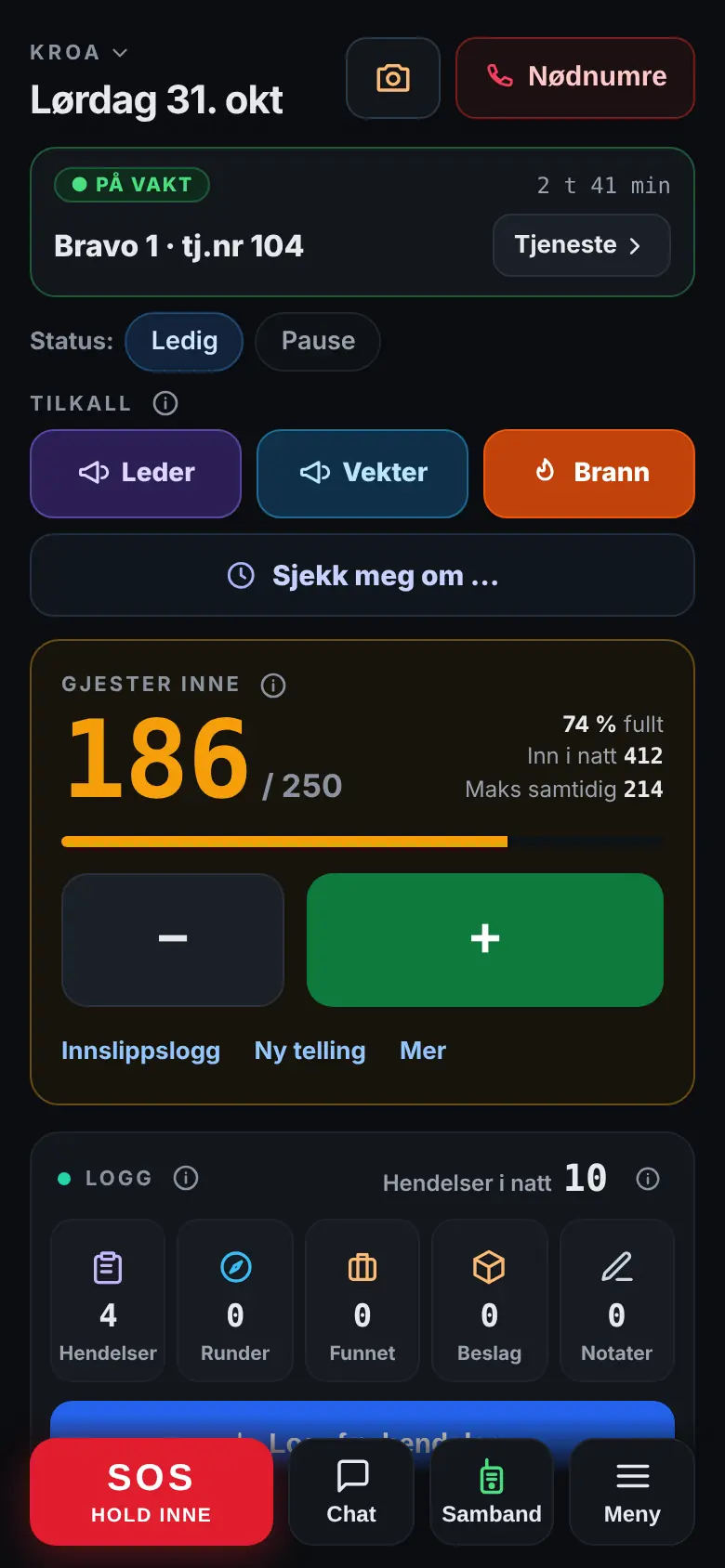
What a night at a venue demands
A full house, a queue at the door, last call and incidents that must be documented – all in the same app for everyone on duty.
Guest counter and capacity
Count in and out with big buttons – also with several entrances against the same capacity. The colour shows how full it is, and everyone on duty gets an alert when it's nearly full.
Age check and refusals
Enter the date of birth, and the answer appears in large letters: OK or Too young – with the full national ID number, the app also checks that it's genuine. Refused and removed guests are counted with a reason, without names.
Incidents and use-of-force reports
Choose what happened, dictate or type the text and save. If force was used, each person involved gets their own use-of-force report, filled in with the time, place and text.
Bans and sightings
Who is banned, with photo, severity and end date. If you spot one of them in the queue, tap “Report a sighting”, and the others on duty are told. Danger and actions tell you how careful to be.
SOS, call-out and routine check-in
Hold down the SOS button, and your colleagues on duty and management get the alarm with your location, and you see who's coming. The call-out repeats until someone comes, and the routine check-in alerts the team if a steward doesn't answer.
Silent SOS and fall alarm
Hold the SOS button down for 4 seconds, and it becomes silent: your colleagues are told not to call you. The fall alarm asks “All OK?” when the phone detects a fall, and sends an SOS if nobody answers.
Radio and chat
Hold down and talk to the others on duty, right in the app – also with a locked screen, a headset and a Bluetooth button. The chat has voice messages, photos and quick buttons.
Confiscations
Register what you take from a guest, with a photo and where it is now. The app reminds you until it's been handed to the police or locked away.
Last call and fire alarm
A countdown to last call with the steps for closing, and the Fire button with your own steps to follow when the fire alarm goes off.
Screen at the entrance
Show how many people are inside on a TV or tablet, in the same colour as in the app. The screen shows no names.
Schedule and hours
A schedule with a reminder before the shift, shift swaps and open shifts – also in the calendar on your phone – and an overview of the hours for the employees.
Final report by email
When the shift is over, the report is done: the evening hour by hour, staffing, incidents, confiscations and lost and found – straight to your inbox.
The answer ready when someone asks
What happens during the night is written down as it happens – not from memory the next day. Then you have the answer ready when the police, the licensing inspection, the fire service or the owner asks.
Guest numbers and capacity
How many were inside hour by hour and per quarter hour, and the highest number compared with the capacity – as PDF and CSV for the fire service or the licensing inspection.
The use-of-force log
All use-of-force reports for a month or a year, with both signatures and what's pending – download as PDF and CSV.
Who was on duty
Going on and off duty, lead guard and hours – for every venue, every night.
Bans
Who is banned, why and for how long – approved by a manager, with the decision as a PDF and an alert before the ban expires. The sightings, return attempts and comments are kept in one history for the person.
Confiscations
What was taken, where it was stored, and when and to whom it was handed to the police – ideally with the case number and a photo of the receipt.
Age and refusals at the door
An age check against the location's age limit, and refused and removed guests counted with a reason – one tap, no names. You can add your own reasons.
What you're wondering about
Does it suit venues with their own stewards?
Can the venue follow along when we use a security company?
Do the stewards have to download the app?
How does the radio work?
How do the bans work?
Does it work for several locations?
What does it cost?
What does it cost?
Where is the data stored, and is it safe?
Ready to try Vekterlogg at your venue?
Sign up your organisation, invite the guards and start using the app tonight – or book a demo first.